$ cd ~/projects/ita
Ita
A virtual pet for two, fed entirely by housework. One of you sets the chores, the other does them, and a small pixel girl on a farm keeps score.
- mobile
- game
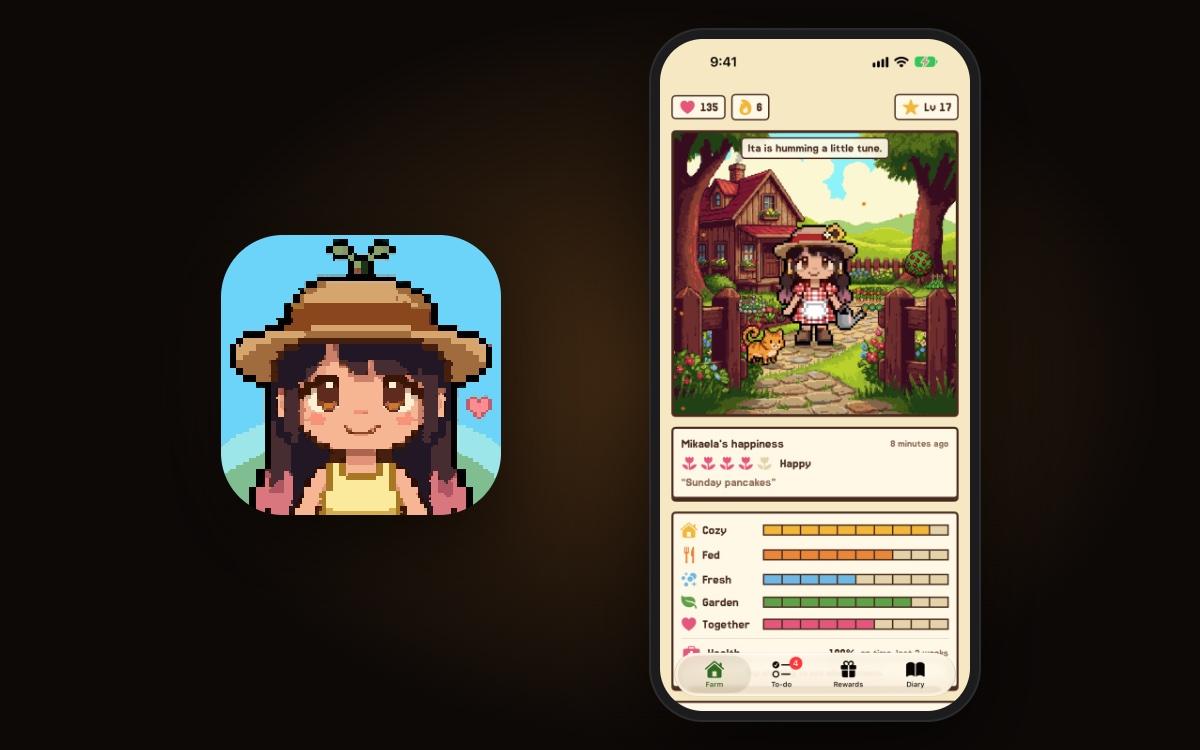

Ita
A virtual pet for two, fed entirely by housework.
She sets the chores. He does them. A small pixel girl on a farm keeps score.




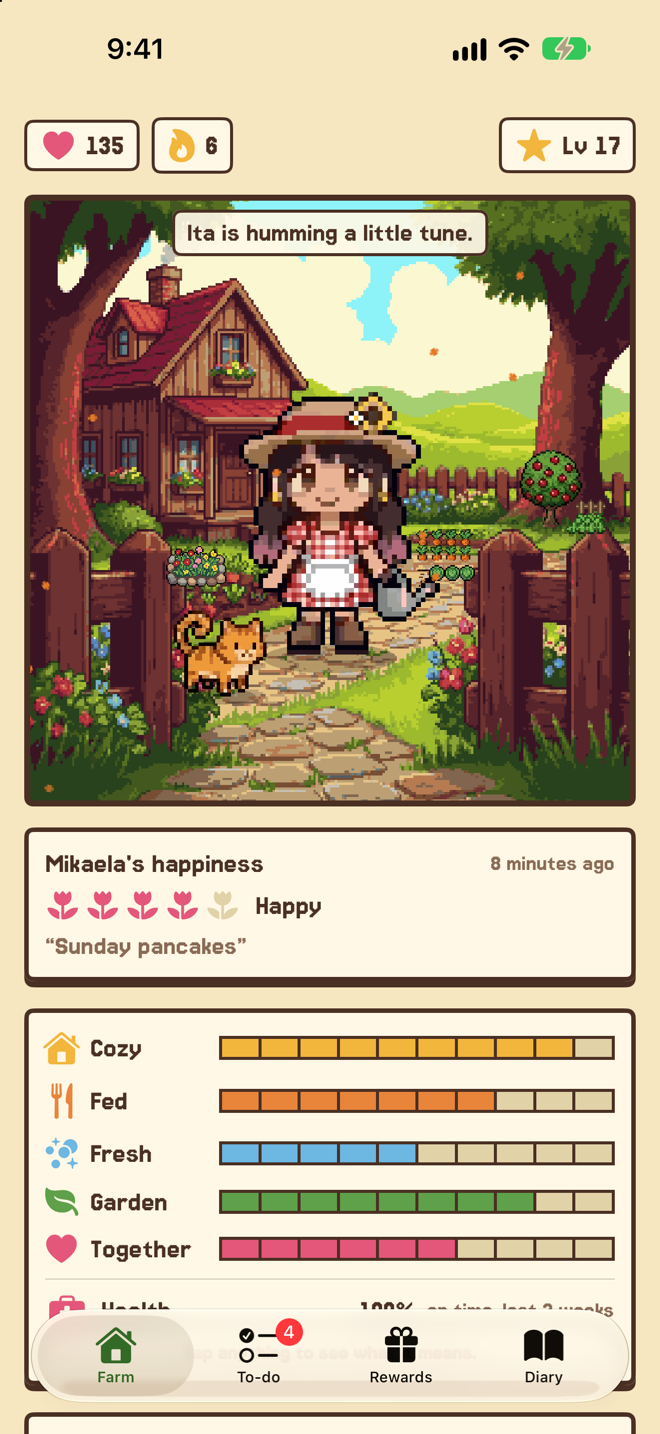
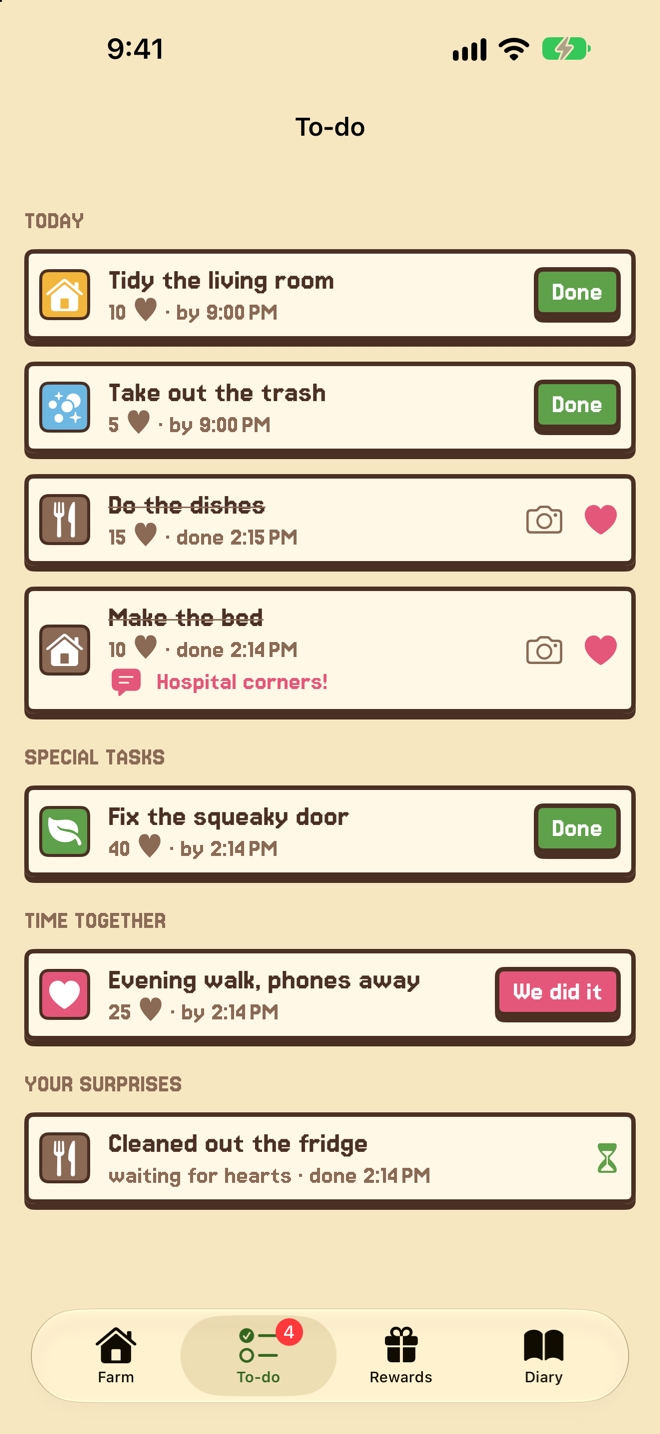
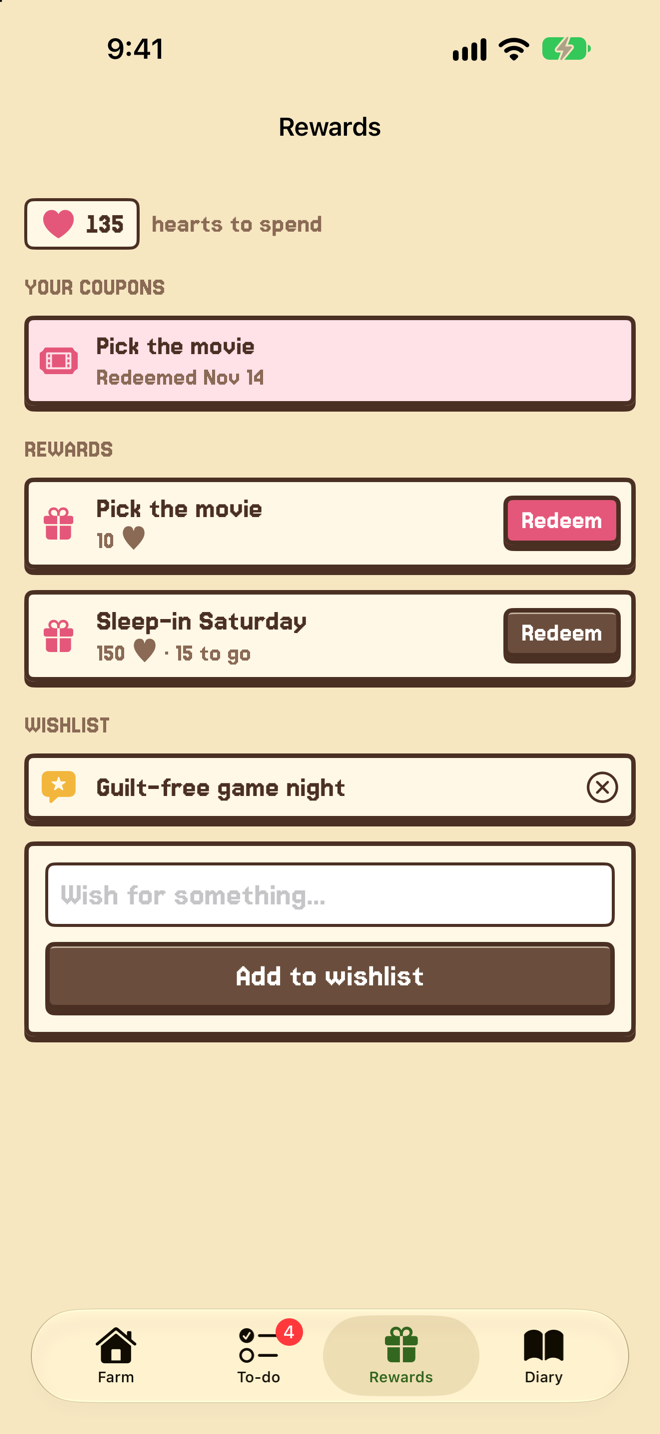
I built this for my wife. Ita is her Hebrew name, and the girl in the straw hat has her hair. The app runs on exactly two phones, hers and mine, through TestFlight. Everything here is the real thing we use, and all of it is yours to turn into a version for your own household.
How it plays
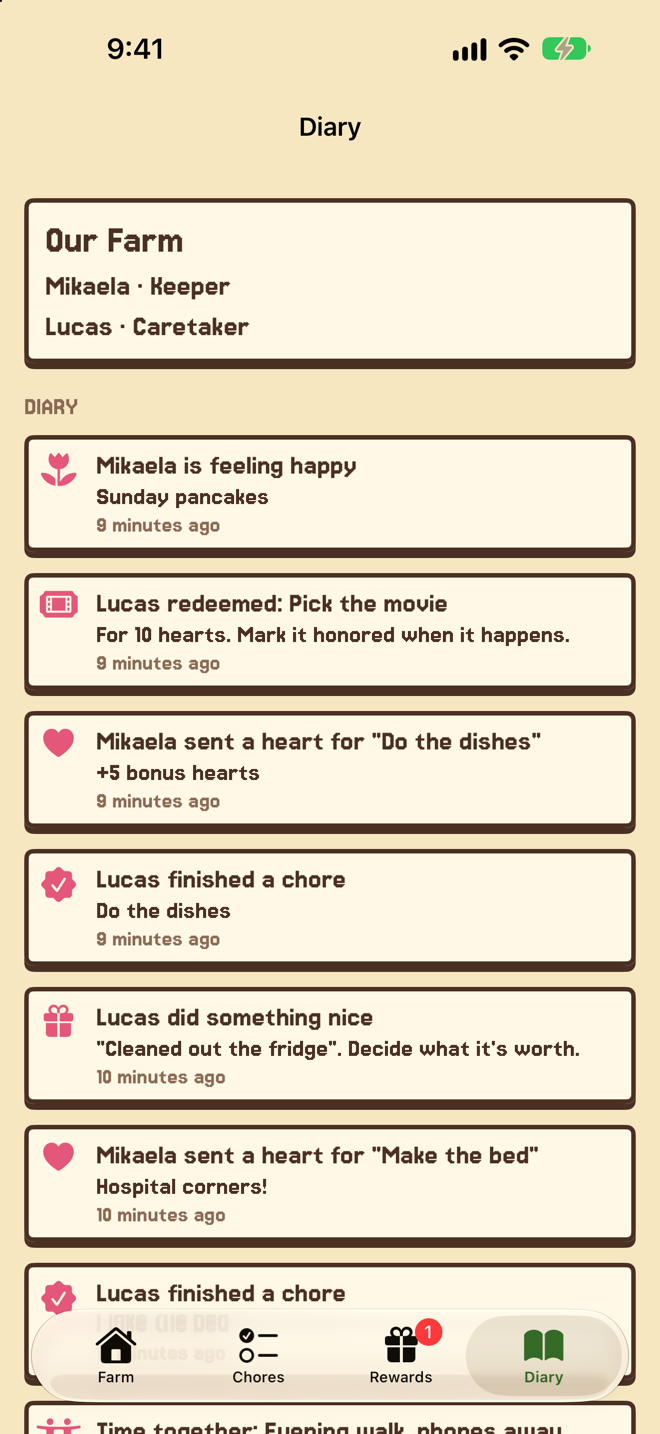
Two people share one farm. One is the keeper, who decides what needs doing. The other is the caretaker, who does it.
- The keeper writes the chores (daily, weekly or one-off), the special tasks and the rewards, and sets what each is worth.
- The caretaker does a chore in real life and taps Done. Ita hops, the matching need fills up, and hearts land in the bank.
- The keeper can answer a finished chore with a bonus heart, a note ("Hospital corners!") or a gentle request for a touch-up, which never takes hearts back.
- Hearts are spent on rewards the keeper has priced: pick the movie, sleep-in Saturday, guilt-free game night.
Ita never dies, never gets sick and never leaves. Neglect makes her sleepy and brings a drizzle; one good day perks the farm back up. A missed chore is never shown as overdue. It costs a little health and nobody gets nagged.
What is in it
Five needs, one mood
Each need drains on its own clock and is filled by one kind of chore.
| Need | Filled by | Empties in |
|---|---|---|
| Cozy | Cleaning and tidying | 3 days |
| Fed | Cooking, dishes, groceries | 1.5 days |
| Fresh | Laundry, trash, bathroom | 3 days |
| Garden | Repairs, errands, plants | 7 days |
| Together | Quality time, confirmed on both phones | 4 days |
Ita's mood is the average of the five and sets how lively she is and the weather on the farm. Health is the share of chores from the last two weeks that were done on their day, so steady beats heroic. Streaks forgive one missed day a week.
Her happiness, set by hand
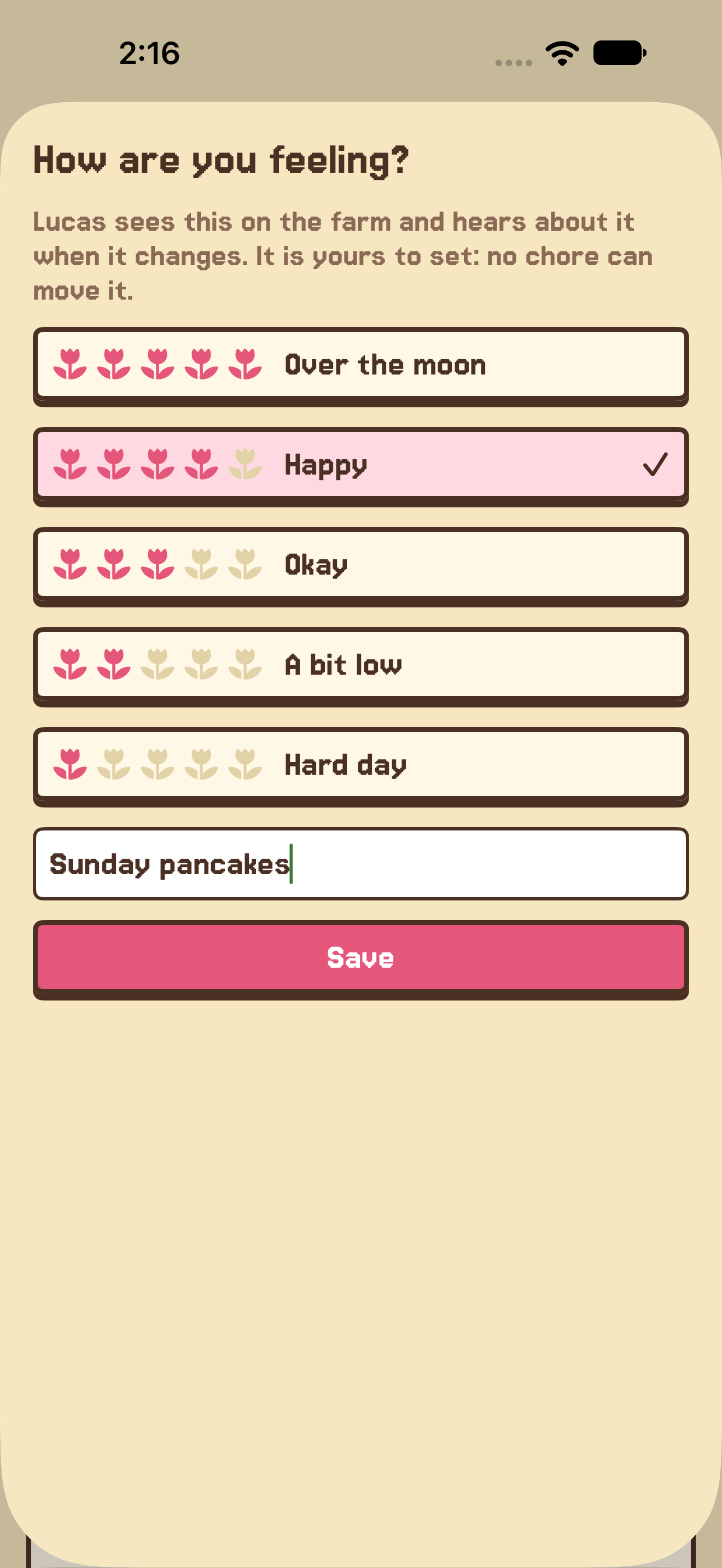
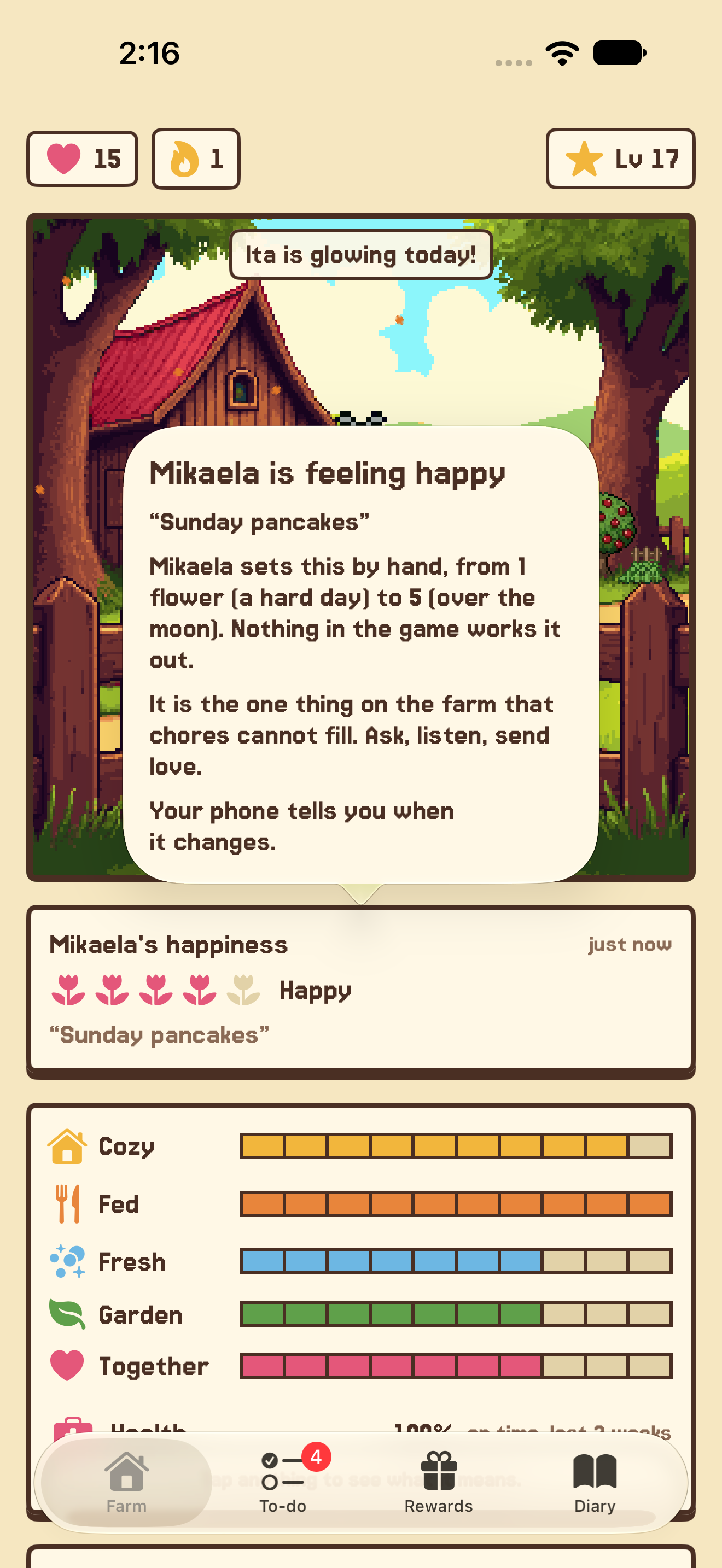
The one number on the farm that nothing computes. The keeper says how she is actually feeling, from one tulip (a hard day) to five (over the moon), with an optional line about why. The caretaker sees it at the top of the farm and gets a notification when it changes. No chore can move it, and the database refuses anyone but the keeper who tries.
She grows up, and so does the farm

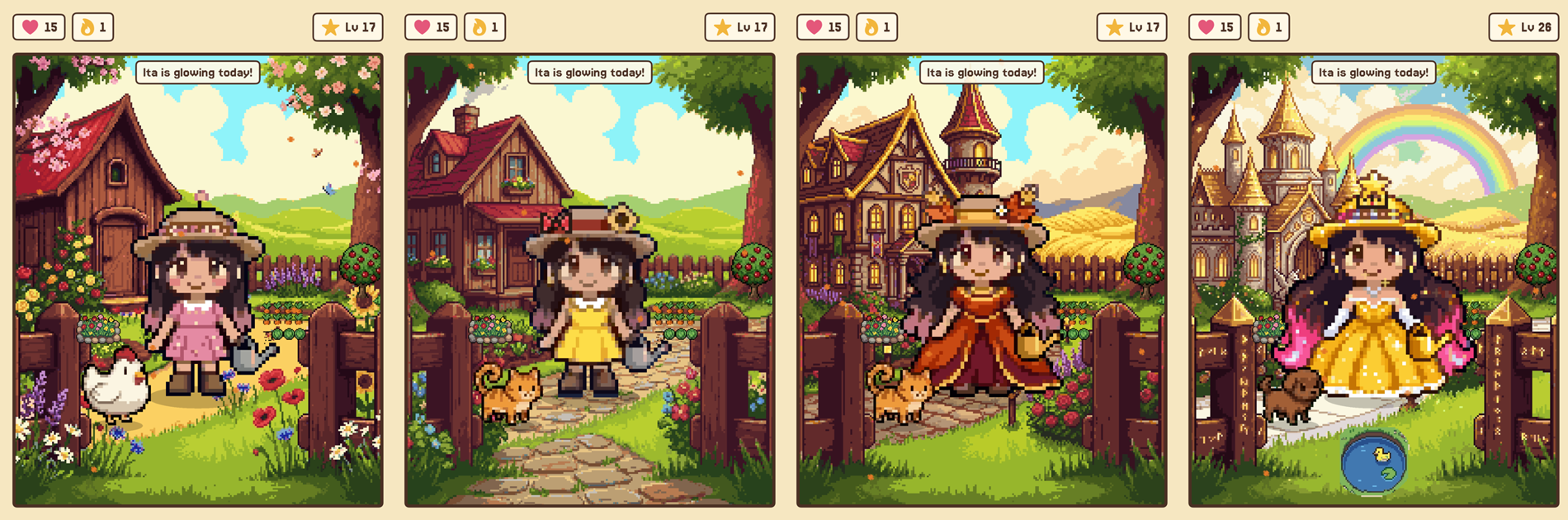
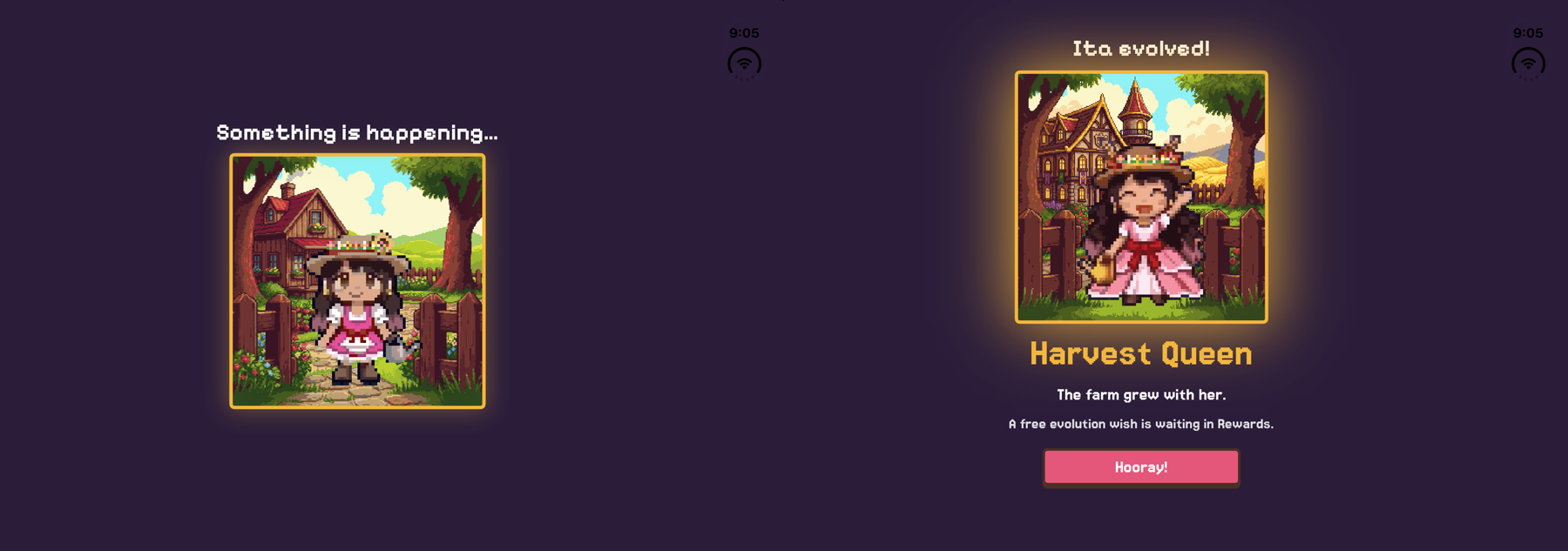
Only special tasks make Ita evolve: Sprout, Bloom, Farm Girl, Harvest Queen, Golden Ita. Each stage has its own body (longer hair, earrings, a gown, then a golden ball gown) and repaints the farm behind her, from a barn to a palace under a rainbow. Both phones get a cutscene, and each evolution comes with a free reward wish.
| Becomes | Special tasks | Level |
|---|---|---|
| Bloom | 3 | 4 |
| Farm Girl | 8 | 9 |
| Harvest Queen | 15 | 16 |
| Golden Ita | 25 | 24 |
Thirty levels of things to unlock
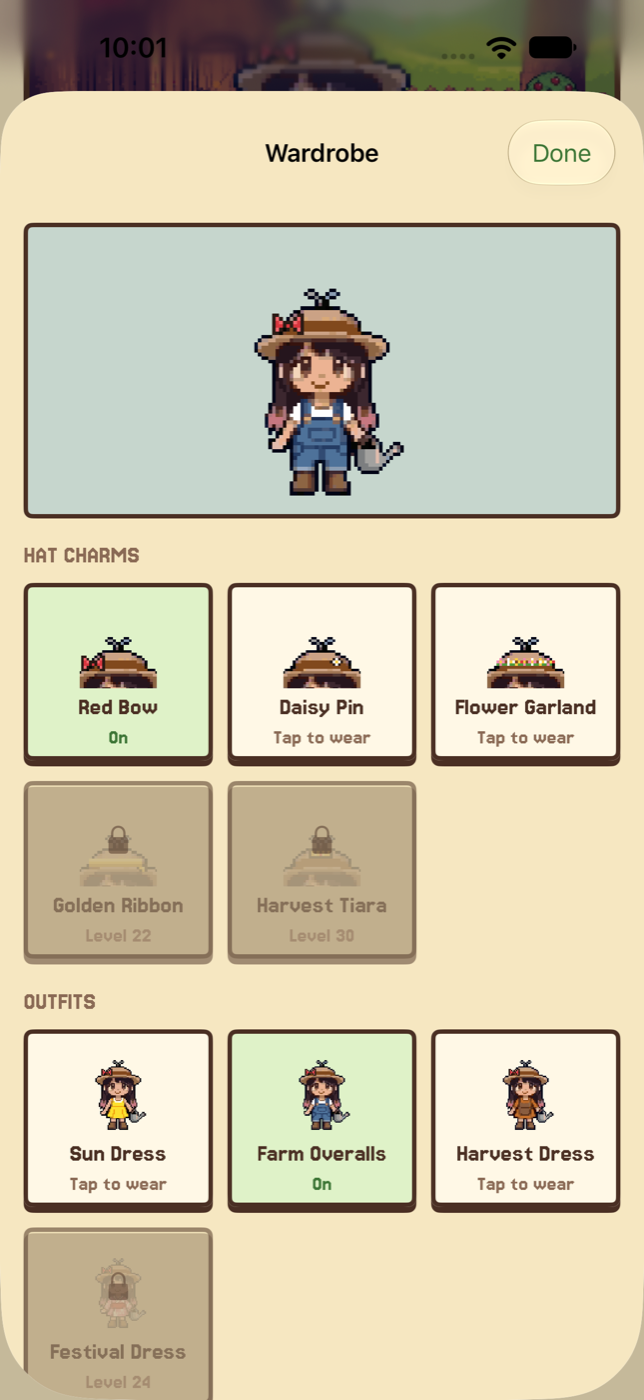
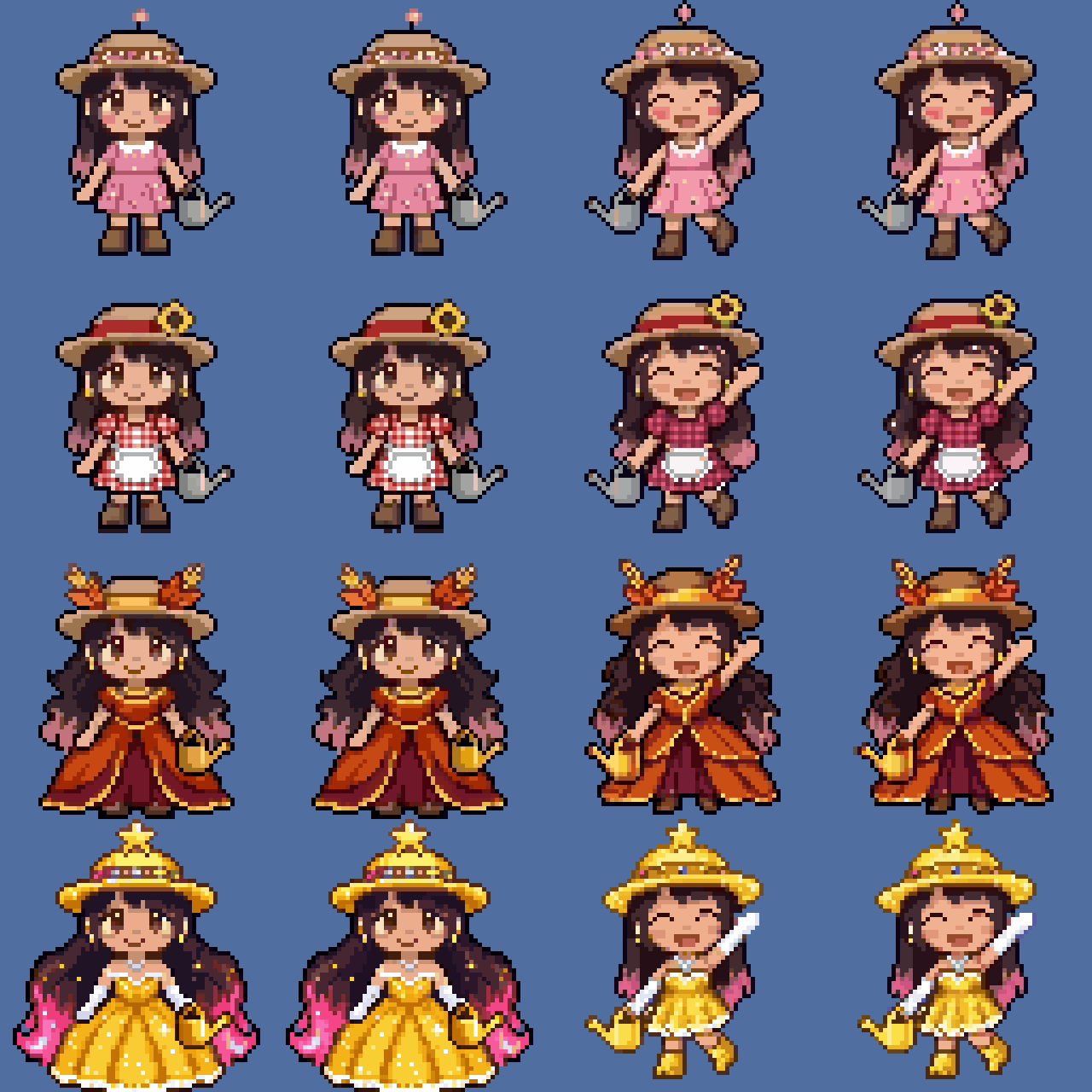
Every heart earned is also one XP, and XP is never spent, so the level only goes up. Levels unlock outfits, hat charms, a companion (chicken, cat, cow, puppy) and farm pieces (flower bed, vegetable patch, apple tree, duck pond, windmill). Outfits are drawn once per stage, so a dress swaps while her hair, hat and jewellery stay. Either person can dress her.
The small things
- Time together only counts when both phones tap "We did it".
- Surprise acts: the caretaker logs something nice done unasked, and the keeper decides what it was worth.
- Photo proof: attach a picture to a finished chore.
- Send love: a "thinking of you" from either phone to the other.
- Tap anything (hearts, streak, a need, health, mood) for a plain explanation, worded for whoever is holding the phone.
- Push notifications that behave: finished chores arrive as one digest, not one buzz each; nothing is delivered during quiet hours; every kind can be switched off.
- A widget for the home and lock screen with Ita and her lowest need.
- Seasons and daylight follow the real calendar and clock: petals in spring, leaves in autumn, snow in winter.
- A theme song, synthesized from a Python script: a goofy reggae sing-along with a ringing telephone. Listen.
It unfolds
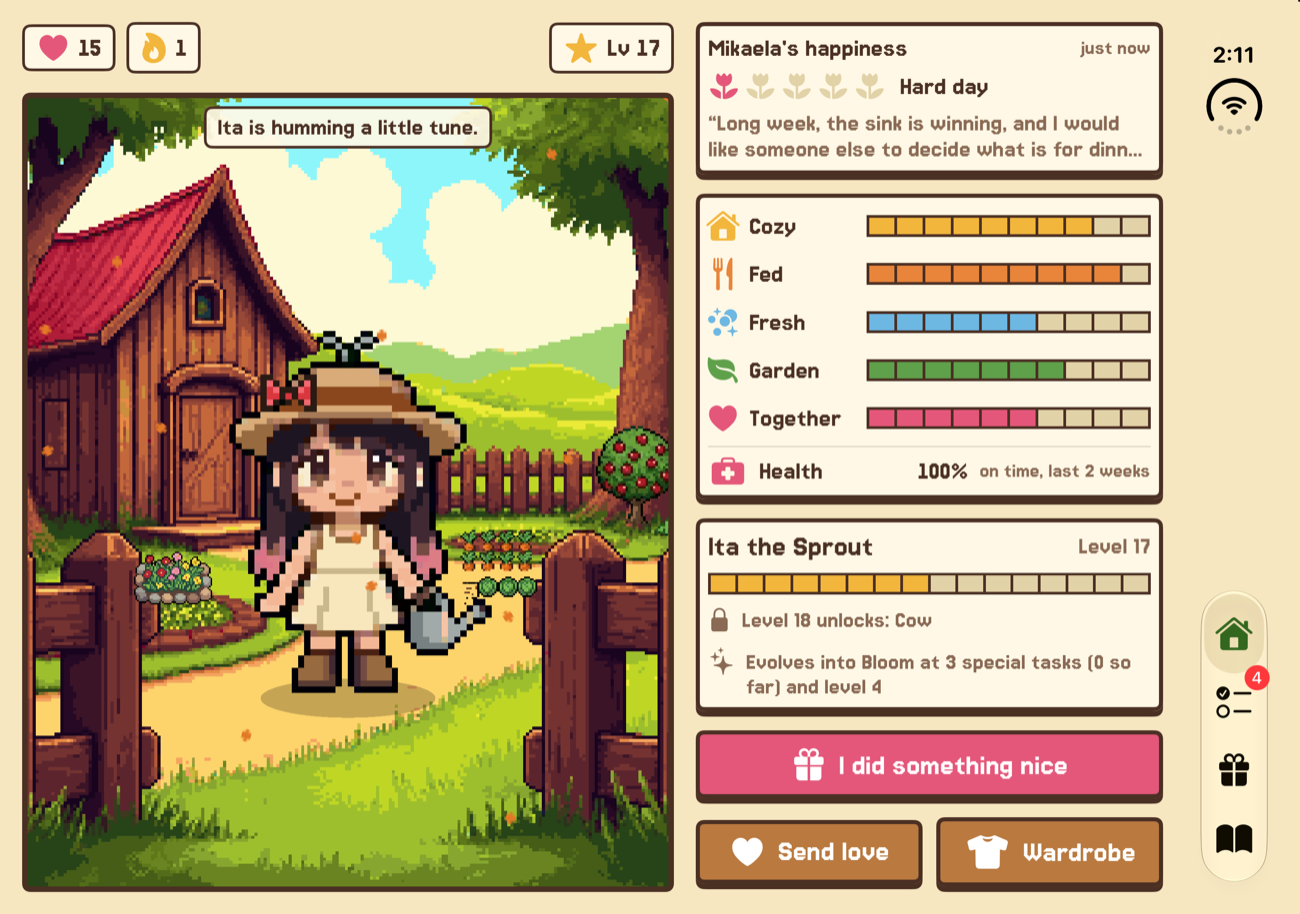
On a wide screen the farm fills the left side from top to bottom and the panels run down the right. On a phone it is one scrolling column.
How it is built
flowchart LR
  K["Keeper's iPhone"] <--> API
  C["Caretaker's iPhone"] <--> API
  subgraph Supabase
    API["Auth, REST, Realtime"] --> DB[("Postgres<br/>row-level security<br/>game rules as functions")]
    CRON["pg_cron<br/>daily tasks, reminders"] --> DB
    DB --> Q["push queue"] --> FN["send-push<br/>edge function"]
  end
  FN --> APNS["Apple Push"]
  APNS -.-> K
  APNS -.-> C
- App: native Swift. SwiftUI for the screens, SpriteKit for the farm,
WidgetKit for the widget,
supabase-swiftfor auth, data and realtime. - Rules live in the database. Anything that moves hearts or XP is a Postgres function, so neither phone can write points directly, and row-level security keeps each household to itself.
- The same maths twice.
GameCore(a Swift package) and the database both compute decay, levels and stages, and a SQL test checks that they agree. - Need decay is computed when read, from a timestamp. Nothing ticks.
| Path | What |
|---|---|
App/ |
The iOS app: Backend/ (model, sound, push), UI/, Scene/ |
Widget/ |
Home and lock screen widget |
Shared/ |
Code used by both the app and the widget |
GameCore/ |
Pure game maths as a Swift package, with unit tests |
UITests/ |
UI tests that play the core loop on the simulator |
supabase/migrations/ |
Schema, row-level security, game logic, push queue, cron |
supabase/functions/ |
send-push: delivers queued notifications to Apple |
supabase/tests/game.sql |
Rules and security checks (runs in a rolled-back transaction) |
tools/art/ |
Retro Diffusion client and batch specs for the pixel art |
tools/audio/ |
Synthesizes the chiptune effects and the theme |
tools/dev/ |
Build, seed, reset, screenshot, device and TestFlight helpers |
assets/ |
Every generated image, with the request and price behind it |
project.yml |
XcodeGen spec; the .xcodeproj is generated, not committed |
The project, its files and its bundle ID keep the working name Mikaelagochi
(and Mika in code). Only the name on the home screen and the girl are Ita.
Make your own
1. Run it on your Mac
You need Xcode, Docker, Python 3, and:
brew install xcodegen supabase/tap/supabase
Then:
git clone https://github.com/melucasleite/ita.git && cd ita
cp App/Config/Secrets.example.xcconfig App/Config/Secrets.xcconfig
supabase start                        # local backend in Docker, ports 568xx
tools/dev/reset.sh                    # apply the migrations, seed a two-person farm
xcrun simctl boot "iPhone 17 Pro"     # any simulator you have
SIM="iPhone 17 Pro" tools/dev/build.sh
Open the app in the simulator and sign in as keeper@mika.test or
caretaker@mika.test, password farmfarm. To watch one phone react to the
other without a second simulator, act as the other person from the terminal:
tools/dev/act.py caretaker complete "Take out the trash"
tools/dev/act.py keeper love "Dinner at 7?"
tools/dev/act.py keeper happiness 2 "Long week"
Nothing so far costs money or needs an Apple developer account.
2. Make her yours
| To change | Where |
|---|---|
| Her name | Add a migration like supabase/migrations/*_rename_to_ita.sql (it rewrites every message the database produces), then replace the word Ita in the Swift sources |
| Her look | The prompts in tools/art/specs/. See the art section below |
| Starter chores and rewards | addStarterChores and addStarterRewards in App/Sources/Backend/AppModel.swift |
| Needs and how fast they fade | GameCore/Sources/GameCore/Needs.swift and private.need_decay_days in the first migration. They must match |
| Levels, unlocks, stages | GameCore/Sources/GameCore/Progression.swift, with public.level_for_xp and public.stage_for in the database |
| Notification wording | The functions in supabase/migrations/, mostly private.cron_nudges |
| Colours and fonts | App/Sources/UI/Theme.swift |
| The theme song | tools/audio/make_audio.py, a step sequencer in plain Python |
After changing game rules, run the tests below. They fail loudly when the app and the database disagree.
3. Draw your own girl
All the pixel art was generated with Retro Diffusion
from the specs in tools/art/specs/, in this order: candidates, her hair,
the icon, the wardrobe, a body per stage, an outfit per stage, a farm per stage.
Later batches take earlier outputs as their input image, which is what keeps her
recognisable from Sprout to Golden.
cp .env.example .env                                           # add your Retro Diffusion key
tools/art/rd.py balance
tools/art/rd.py run tools/art/specs/01_candidates.json         # prices it, spends nothing
tools/art/rd.py run tools/art/specs/01_candidates.json --yes   # generates
tools/art/import_assets.sh                                     # copy the chosen sprites into the app
Every output folder has a manifest.json with the exact request and price of
each file, so anything can be regenerated. The 96 images recorded in this repo
cost about $17 in total, drafts included.
Sound effects and the theme come from tools/audio/make_audio.py, standard
library only, so there is nothing to license.
4. Put it on two real phones
This part needs an Apple developer account and a Supabase project.
Pick your identifiers. Replace
us.lucasleitewith your own reverse domain inproject.yml, the two.entitlementsfiles,Shared/WidgetSnapshot.swiftandtools/dev/*.sh.Create the backend. Make a project at supabase.com, then:
supabase link --project-ref <your-project-ref>
supabase db push --remote
In the dashboard, under Authentication, turn off email confirmation (or leave it on and confirm each account by email).
Point the app at it. In
App/Config/Secrets.xcconfig(git-ignored) setSUPABASE_URL,SUPABASE_KEY(the publishable key) andDEVELOPMENT_TEAM.Install on a connected iPhone.
tools/dev/device.sh            # full signing: push notifications and the widget work
PLAIN=1 tools/dev/device.sh    # no capabilities, if Apple will not register them yet
Turn on push. Create an APNs key at developer.apple.com (Certificates, Identifiers & Profiles, Keys) and keep the
.p8out of the repo. Then:supabase functions deploy send-push supabase secrets set \ PUSH_HOOK_SECRET="$(openssl rand -hex 32)" \ APNS_KEY_ID=<key id> APNS_TEAM_ID=<team id> \ APNS_BUNDLE_ID=<your bundle id> \ APNS_KEY_P8="$(cat AuthKey_XXXXXXXXXX.p8)"Tell the database where the function lives, in the SQL editor, using the same secret:
select vault.create_secret('https://<ref>.supabase.co/functions/v1/send-push', 'push_hook_url');
select vault.create_secret('<the PUSH_HOOK_SECRET value>', 'push_hook_secret');
Ship to TestFlight. Create the app record once at App Store Connect for your bundle ID, then run
tools/dev/testflight.sh. Add both people as internal testers and install from the TestFlight app.Close the door. The first person to sign up creates the farm and the second joins with the invite code on the Farm tab. Once you are both in, switch off new sign-ups under Authentication in the Supabase dashboard.
Tests
(cd GameCore && swift test)                                    # game maths
psql "postgresql://postgres:postgres@127.0.0.1:56822/postgres" \
  -f supabase/tests/game.sql                                   # rules and security
supabase db advisors --level info                              # Supabase linter
tools/dev/uitest.sh                                            # UI tests (SIM="..." to pick a device)
The SQL file plays a whole household through pairing, chores, hearts, rewards, evolution, time travel and push delivery, and checks along the way that the caretaker cannot set prices, that points cannot be written directly, and that a stranger sees nothing.
Credits
- Pixel art generated with Retro Diffusion.
- Fonts: Jersey 15 and
Pixelify Sans, both under
the SIL Open Font License (copies in
App/Resources/Fonts/). - Backend by Supabase; project file by XcodeGen.
- Game design by the keeper. Chores by the caretaker.
License
MIT. Build one for somebody you love.
more projectsls ~/projects
~/ai-desloper
Desloper scores how generic an AI-written landing page is against eight principles, with deterministic detectors plus a model judge, then hands you a fix prompt built from the findings you keep.
~/mark85
Iron Man suit firmware: four limb IMUs drive synthesized stereo servo whir and repulsor charge-up.
~/claude-tts
Claude Code narrates its work out loud with offline neural TTS. Piper + FFmpeg, driven by hooks.
~/claude-usage-widget
Your Claude Code limits as Apple-Watch-style activity rings, with a forecast of when you'll hit them.
~/mini-kitchen
Toddler play kitchen with a sink that actually runs. CNC oak plywood, 12 V pump, Python-generated cut sheets.
~/speedster
A focused, dark-mode Rubik's cube timer for iOS: scrambles, rolling averages and progress charts.
~/age-of-potatoes
The source behind ageofpotatoes.com, golden-file tests for the deterministic sim included.